
- How to Use Equipment
- Facility Usage Rules
Wi-fi
SSID:kamata1fa / kamata1fb
Password : tokyo123
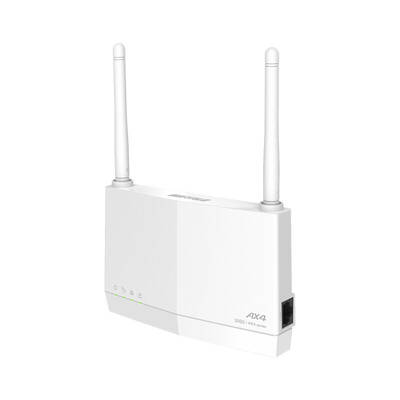
When Wi-Fi won't connect
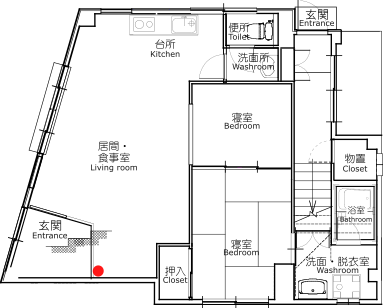
If you still cannot connect after making the above settings, please restart the Wi-Fi router located at the red mark on the Floor Plan.
To restart the Wi-Fi router, unplug the device from the power outlet, wait a few seconds, then plug it back in.
Floor Plan
Wi-Fi router
TV
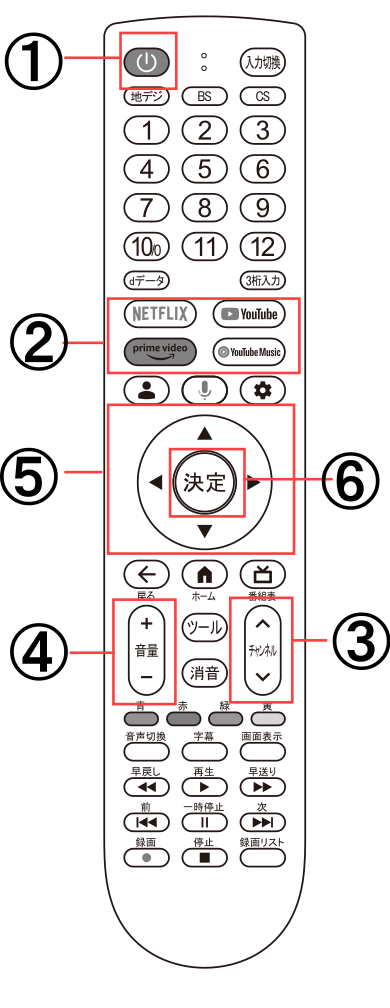
- ON/OFF
- Online Video
Used when accessing video streaming services.
This facility supports Prime Video, Netflix, YouTube, and TVer. - Channel Selection
- Volume Control
- Navigation Keys
Used to choose videos within streaming services. - Select
Used to finalize your selection of programs within streaming services.
Watching Netflix
To watch on Netflix, press the Netflix button on your remote, then select “Minamikamata1f” to start viewing.
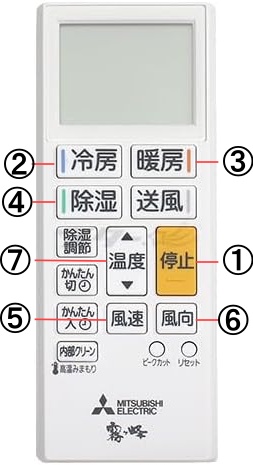
Air conditioner / Heater
Remote Control 1
Remote Control 2
Remote Control 1
- Off
Use when turning off the air conditioner. - Cooler
- Heater
- Dehumidifier
- Wind power
- Wind direction
- Temperature Control
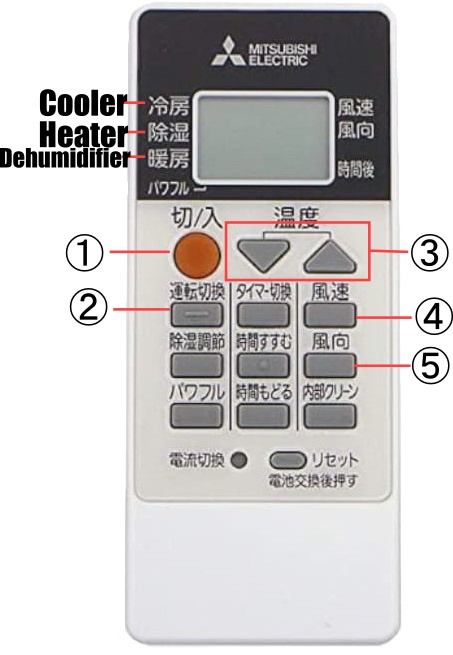
Remote Control 2
- ON / Off
- Drive Mode Switch
- Temperature Control
- Wind power
- Wind direction
Water heater, Shower, Bathtub
Water heater remote control(Behind the refrigerator)
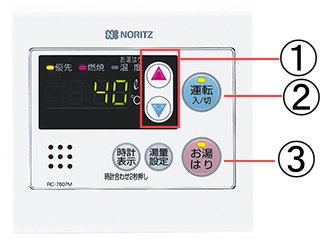
Bath Remote Control
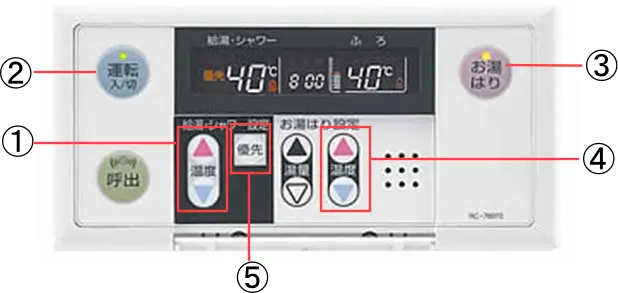
- Water Temperature Control
- ON/OFF
- Filling the Bathtub
Use this when you want to fill the bathtub with water. It will stop automatically once the bathtub is full.
If the water level is insufficient, press again. Once the desired amount is reached, press again to stop. - Control the Bath Water Temperature
- Priority Switch
Press this when the temperature cannot be changed.
Washing machine
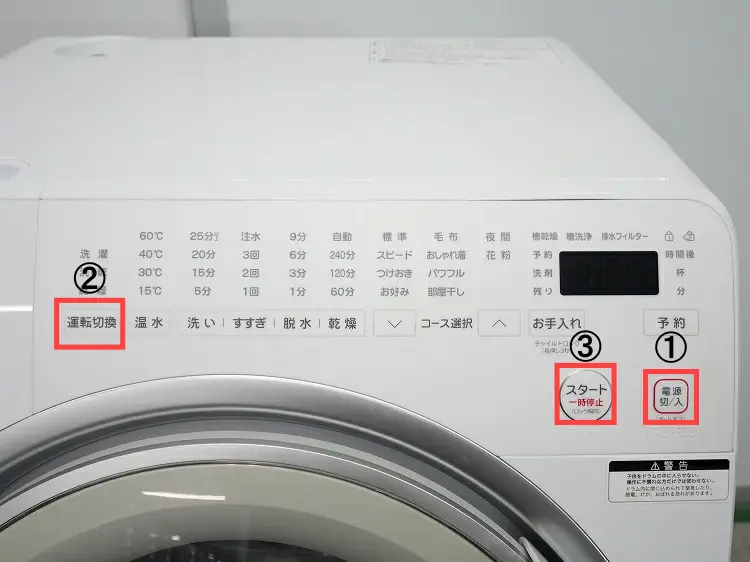
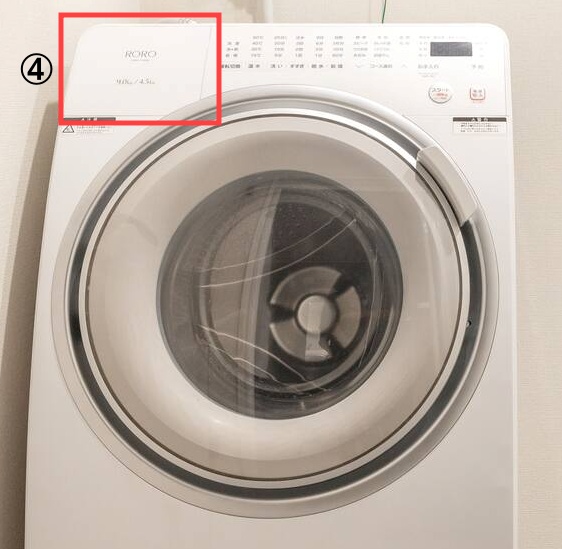

- ON/OFF
- Operation Mode
Select "Wash Only(洗濯)", "Wash and Dry(洗▶乾)", or "Dry Only(乾燥)". - Start
- Detergent Dispenser Location
- Detergent Dispenser
How to Washing
- Load the laundry and close the door.
- ① Press the ON/OFF button to turn on the machine.
- Press ②Operation Mode button to choose a wash cycle. If drying after washing, select “洗▶乾(2nd)”.
- Add detergent to the ④⑤detergent dispenser.
- Press the Start button.
How to Dry
- Load the laundry and close the door.
- Press the ①ON/OFF button to turn on the machine.
- Press ②Operation Mode button and choose the “乾燥 (3rd)” cycle.
- Press the ③Start button.
IH cooktop
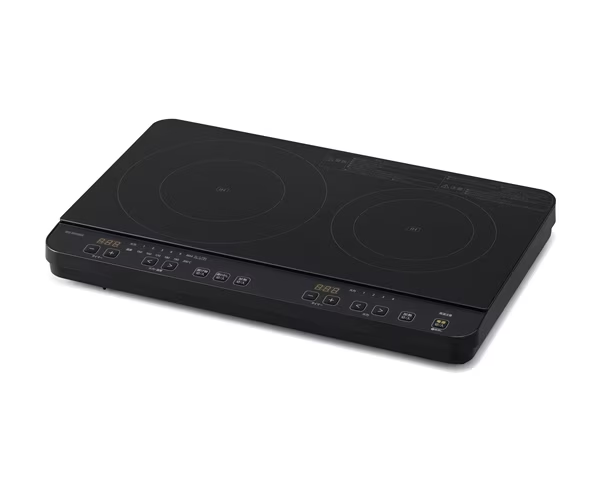
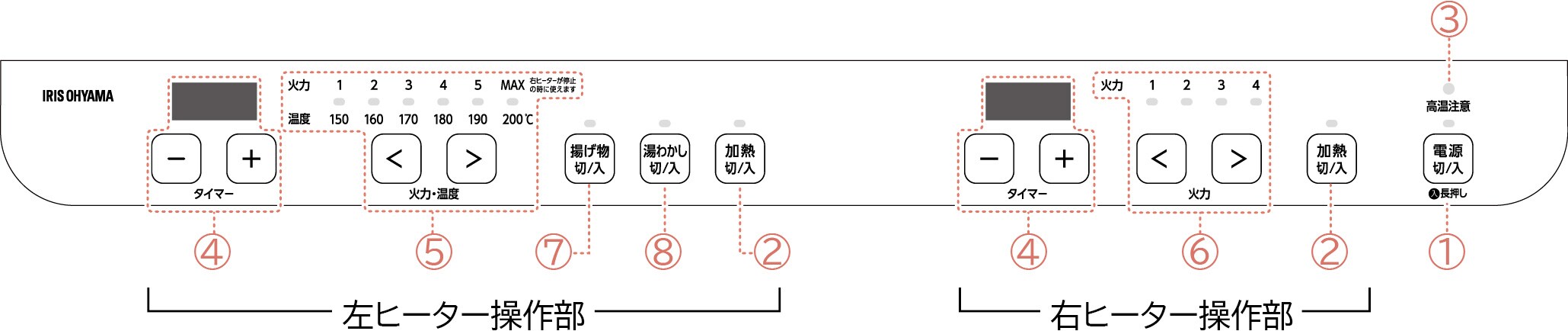
- ON/OFF
First, turn on the power.
Press and hold for at least 2 seconds to turn on the power. - Heat On/Off
Press the heat button to start heating. - High Temperature Warning Light
- Timer Button
Press the timer button to adjust the heating time. - Left Burner Heat Control
- Right Burner Heat Control
- Fry On/Off
Use this when frying food. - Boil Water On/Off Button
Use this when boiling water.
Microwave oven
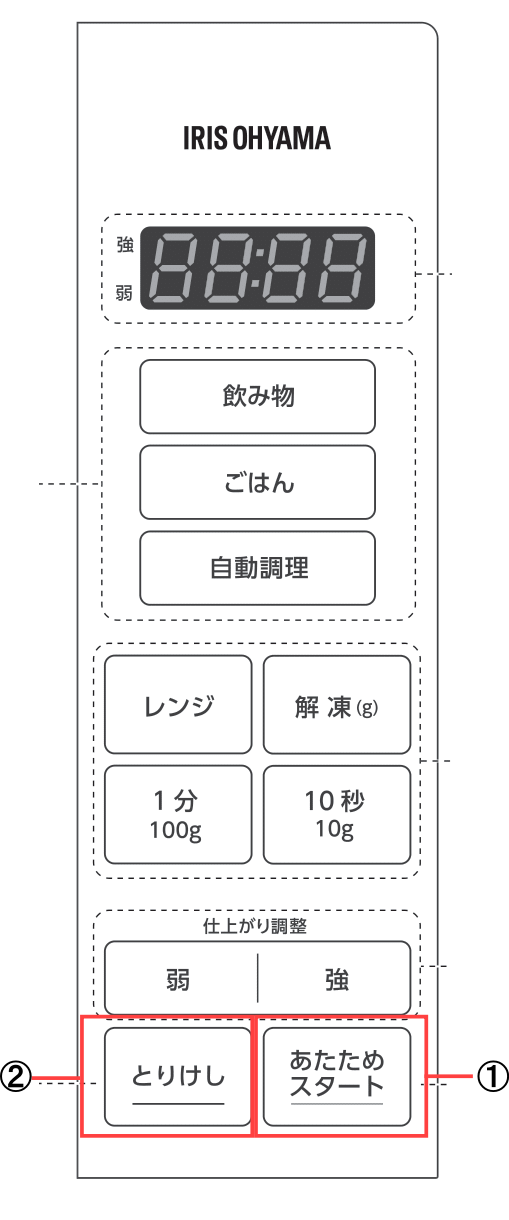
- Start Warming
Use this when warming food. - Cancel
Use this to stop heating.
How to Warm Food
- Place food inside and close the door.
- Press the ①“Start Warm” button.
To warm for longer than 30 seconds, press the ①“Start Warm” button repeatedly to set the desired time. - To pause heating, press the ② “Cancel” button.
Pressing the ② “Cancel” button again during pause will return to the initial state. - To resume heating, press the ① “Start Warm” button.
Check-in & Check-out
Check-in: After 3:30 PM
Check-out: By 10:30 AM
*Please contact us in advance if you wish for early check-in or late check-out. Additional charges may apply.
Entrance
Please take off your shoes at the entrance.
Indoor shoes/slippers are provided. Please use them inside the house.
Toilet Use
Do not flush anything other than toilet paper.
Please dispose of diapers, sanitary products, and tissues in the trash bin.
Please keep the toilet clean.
When Leaving the Room
Please turn off all lights, air conditioners, and electrical appliances when you go out.
Thank you for helping us save energy.
No Smoking
Smoking is strictly prohibited inside the room and on the balcony.
If smoking is detected, a special cleaning fee of 30,000 yen will be charged.
Pets
Pets are not allowed.
Noise
Quiet hours are from 10:00 PM to 8:00 AM.
Please be mindful of your voice and the volume of TV and music.
Garbage
Please separate your garbage and dispose of it in the designated bins. If it does not fit in the trash can, please put it in a plastic bag and leave it inside the room. The staff will dispose of it during cleaning.
If you have a large amount of garbage, please contact the host.
Facilities & Equipment
Please handle all furniture, appliances, and amenities with care.
If anything is damaged or lost, please report it immediately.
Security
Please make sure to lock the door when you leave or go to bed.
No entry allowed for non-registered guests.
Emergency
In case of emergency (fire, accident, etc.), please call 119 (fire/ambulance) or 110 (police)
After contacting emergency services, please inform the host as well.
・Contact Details
Host: Keisuke Kojima
TEL:090-3785-5445
Others
Please follow the rules and enjoy your stay.
Violation of rules may result in immediate eviction and additional charges.